Tactile Keyboard Switches — A Practical Walkthrough for Choosing & Tuning Your Feel

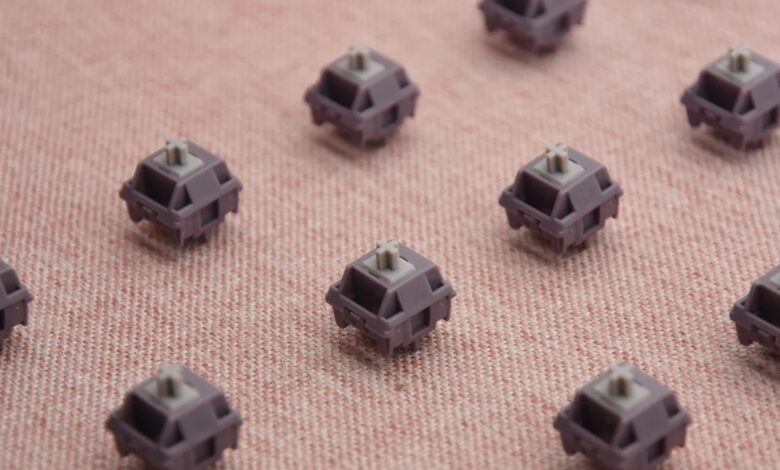
Tactile switches are often the first mechanical switch many users try — they give a physical cue that a keypress registered without being noisy. This guide breaks down subtle differences between tactile profiles, how to test them, simple mods to improve feel/sound, and a short checklist to pick the right tactile switch for your workflow.
What “tactile” really means (beyond the buzzword)
At its core, a tactile switch provides a measurable resistance change — a little bump — at or slightly before the actuation point. That bump acts like a tactile “checkmark” for your fingers: you can stop the travel because the switch already sent the signal. But not all tactile switches are equal: some have a subtle whisper of feedback, others a pronounced ridge that you can feel clearly under fast typing.
Quick distinction: linear = smooth; clicky = audible click + bump; tactile = bump only (no mechanical click), with varying sharpness and position.
Subtypes of tactile switches — what to expect
Manufacturers create many tactile variants by changing three main elements: bump sharpness, actuation force, and where the bump occurs. Below is a useful shorthand to think about common tactile personalities.
| Profile | Feel | Best for |
| Subtle tactile | Soft, short bump early in travel | Heavy typists who want feedback without interruption |
| Pronounced tactile | Clear, sharp bump near actuation | Writers & coders who rely on definitive confirmation |
| Wide bump | Longer resistance zone, less “clicky” feel | Users who like a slow, confident press |
How to choose the right tactile switch: short checklist
- Decide primary use: typing(accuracy & comfort) vs gaming (speed & repeatability).
- Prefer quieter environments? favor lighter/softer tactile profiles over loud, sharp bumps.
- Test for actuation force — ~45–55g is common for comfortable typing; heavier feels more resistant.
- If possible, try a switch tester or a hot-swap keyboard before committing.
Practical testing — what to listen and feel for
When you try tactile switches, evaluate three simple things:
- Location of the bump:is the tactile event early (near 1–1.5mm) or later (near 2mm)? Early bumps can speed up typing; later bumps can feel more decisive.
- Sharpness:a sharp bump is very clear but can feel harsh; a soft bump is smooth but might be easy to miss.
- Return and consistency:does the switch feel even on press and release across many keys?
Pro tip: type full sentences and do a short coding snippet — both will reveal how a switch behaves in real use, not just single presses.
Small mods that make tactile switches better (no soldering required)
If you already own a hot-swap keyboard or a tester, these quick tweaks often improve sound and feel:
- Switch lubing:applying a small amount of switch lube on the stem reduces scratchiness and smooths the bump. Use a thin, keyboard-grade lubricant and be conservative.
- Foam dampening:adding a thin foam layer between PCB and case reduces hollowness and makes tactiles sound warmer.
- Keycap change:thicker PBT keycaps often mute high-frequency noise and make the tactile bump feel more rounded.
If you’re new to modding, start with foam and keycaps before lubricating switches — they’re reversible and carry less risk.
Common myths — busted
- “Tactile switches are always slower than linear.”Not necessarily — well-positioned tactiles can be just as quick for most users.
- “All Brown switches feel the same.”Color names are brand conventions. Cherry Brown ≠ Gateron Brown in feel or bump profile.
- “Lubing removes the tactile bump.”Proper, light lubing smooths scratch without removing the bump if done correctly.
Decision guide — quick flow
Answer these two questions to get a recommendation:
- Do you spend more time typing than gaming? — if yes, prefer tactile with medium bump and 45–55g actuation force.
- Do you need a very quiet keyboard? — if yes, choose softer tactiles + thicker keycaps + foam dampening.
One last practical checklist before buying
- Is the keyboard hot-swap? (makes trying different tactile switches easy)
- Does the seller accept returns if the feel isn’t right?
- Are user recordings or sound tests available so you can judge acoustics?
- Do you plan to mod (lube/foam)? If so, factor that into your budget.
Explore tactile options
If you’d like to browse a curated selection of tactile switches and compare profiles, check our collection here:tactile keyboard switches