Walk through any big city today, and you’ll find anime everywhere – on tote bags, VTuber avatars on Twitch, fan zines at conventions, and motion graphics behind DJs in clubs. What used to demand hours of hand-drawing or costly studio work is now something many creators can experiment with from a laptop at home.
Behind this shift is a new wave of image engines such as FLUX.2 and Z-Image, and on top of them, creator-friendly platforms like https://www.ocmaker.ai/ that package all that power into a simple browser workspace for anime fans.
From an empty canvas to a complete character in just minutes
For years, fan art and original character design weren’t limited by imagination — they were held back by time and technical skill. You either:
- Spent years learning digital painting and 3D tools, or
- Paid someone else to bring your characters to life.
Modern image generators change that equation. You describe a hero, villain or side character in natural language – hair colour, outfit, expression, pose, background – and the system returns fully rendered anime-style artwork in seconds. If you don’t like the first attempt, you iterate rather than starting again from scratch.
For busy creatives juggling day jobs, deadlines and side projects, that shift from “I wish I had time to draw this” to “I can test ten ideas on my lunch break” is significant.
What OCMaker AI actually does
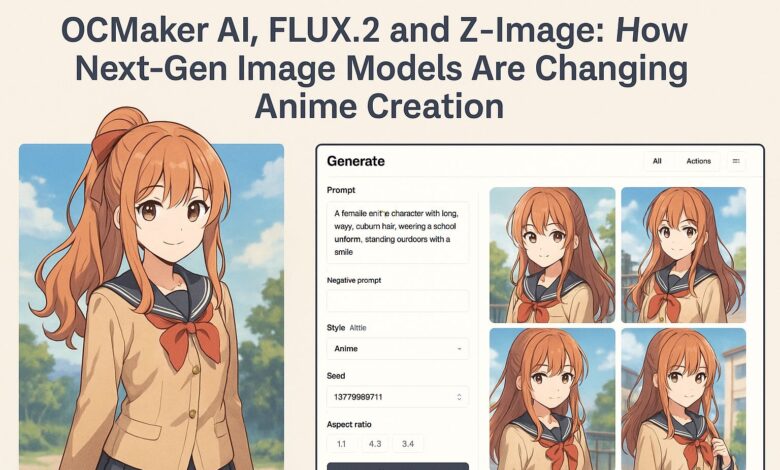
OCMaker AI sits in this new ecosystem as a specialist platform focused on anime and original characters (OCs). In plain terms, OCMaker AI is a user-friendly site that turns text prompts and reference images into polished anime-style characters and scenes, without needing advanced design skills.
On top of a clean, browser-based interface, it offers:
- Prompt boxes tuned for anime details like hair, outfits, expressions and camera angles
- Tools for keeping the same character consistent across multiple poses or scenes
- Options to upload your own sketch or photo as a reference instead of starting from nothing
- Quick exports you can use in webcomics, profile pictures, VTuber rigs, pitch decks or social posts
For many, the on-ramp is the platform’s free AI anime generator, which lets anyone test the workflow before committing to a particular project or subscription.
Where FLUX.2 and Z-Image fit in
Under the hood, platforms like this are increasingly tapping into advanced open image models such as FLUX.2 and Z-Image. These are not consumer apps themselves, but the “engines” that actually turn text into pixels.
In broad strokes:
- FLUX.2 is designed for high-resolution, production-grade images – up to multi-megapixel output, with careful lighting and structure. That helps reduce the “AI look” that can make faces or backgrounds feel slightly off.
- Z-Image, developed by Alibaba’s Tongyi Lab, focuses on efficiency and bilingual understanding. Its Turbo variant is built for fast sampling and strong prompt adherence, including English and Chinese text in the same image.
For anime platforms, this matters less as a technical talking point and more as a practical benefit: sharper line work, more stable anatomy, and fewer retries to get a character’s face, pose and clothing right.
A simple way to think about the difference:
| Model / Engine | Strengths in Practice | What It Means for Anime Creators |
| FLUX.2 | High-resolution output, realistic lighting, strong structure | Clean character sheets, key art, and banners that hold up on large screens or print |
| Z-Image | Fast generation, bilingual text handling, efficient hardware use | Quick iterations for posters, covers, or thumbnails — especially when titles include both English and Chinese |
| Older models | Usable but more artefacts and weaker text rendering | More manual clean-up required and more retries to get a usable image |
OCMaker AI doesn’t ask users to configure any of this. Instead, it abstracts the underlying models into “styles” and “presets”, so artists can choose the look they want rather than worrying about which engine is behind it.
Practical use cases for modern creators
For many readers, the most interesting question is not “which model has what architecture” but “what can I actually do with this in my work?”.
Here are a few concrete examples:
| Role | Typical Need | How OCMaker AI + Modern Models Help |
| Indie comic artist | Design a cast of characters and keep them consistent across chapters | Generate base designs for each character, then reuse them across new poses and angles as the story evolves |
| VTuber or streamer | A distinctive avatar that feels “on brand” | Explore dozens of styles—cute, gritty, cyberpunk, retro—and refine until it matches your online persona |
| Small business or agency | Eye-catching anime visuals for campaigns aimed at younger audiences | Quickly prototype poster art, social posts and landing page headers before commissioning a final illustration |
| Educator or community organiser | Visual assets for workshops, clubs or events | Create mascots and scene illustrations without needing the budget of a full design team |
Because generation is so fast with engines like FLUX.2 and Z-Image, you can treat visuals the way you treat copy: something to draft, edit and refine, not a one-shot effort you’re stuck with for months.
Reducing the technical friction
Another point that matters for smaller teams and independent creators is infrastructure. Running high-end models locally often demands specialist GPUs and tooling – something a solo artist, teacher or small studio may not have.
Hosted platforms absorb that complexity. Instead of managing drivers, VRAM limits and pipelines, you work in a browser:
- Type your idea
- Adjust sliders for style, realism or aspect ratio
- Trigger a new batch of images
- Save the ones that work and move on
Because engines like FLUX.2 and Z-Image are tuned for efficiency, the experience feels closer to browsing than to “waiting for a render”, even at higher resolutions. The result is a workflow that feels familiar to anyone comfortable with modern web apps.
Creativity first, technology second
There’s a temptation to get lost in benchmark charts and model releases. In practice, most creators care about different questions:
- Does this tool help me tell my story faster?
- Can I keep my characters consistent from scene to scene?
- Do the images look good enough for my audience – whether that’s TikTok, print or a crowdfunding page?
Platforms like OCMaker AI are interesting precisely because they use the latest engines without forcing users to think about them. You’re guided by examples, style presets and simple controls, not by configuration files.
That design matters for inclusivity. It lowers the barrier for people who have ideas but not formal art training, and it gives experienced artists a faster way to explore compositions, lighting setups and costume variations before committing to a final frame.
A few responsible-use reminders
As with any powerful creative technology, there are sensible guardrails to keep in mind:
- Respect copyrights and likeness rights – avoid generating content that imitates specific living people or protected characters in ways that breach platform policies or local law.
- Be transparent with collaborators and clients – if you use automated tools in a project, make sure everyone involved understands what was generated and what was hand-finished.
- Check usage terms – different platforms and models have different rules around commercial use, attribution and redistribution. Read them, especially if you’re planning a commercial release.
Used thoughtfully, these tools are less a replacement for artists and more a new layer in the creative toolkit: something that handles rough explorations and repetitive variations, so humans can focus on storytelling, pacing, world-building and polish.
Looking ahead
The modern creative economy increasingly thrives on hybrid roles – writer-designers, musician-developers, filmmaker-illustrators. The combination of high-end image engines like FLUX.2 and Z-Image with accessible platforms such as OCMaker AI pushes that hybridity even further.
You no longer need to choose between being “the person with ideas” and “the person who can execute”. With a browser, a prompt and a bit of patience, you can be both – and that may turn out to be one of the most important cultural shifts of this decade, far beyond the buzzwords that first brought these tools into the headlines.