Have you ever bought a DVD overseas, only to discover it won’t play once you get home? This frustrating issue is often caused by DVD region locks, especially common with Region 2 DVDs purchased in Europe or Japan. Designed to control where and when DVDs can be played, region codes can quickly turn an exciting purchase into an unusable disc. Fortunately, region restrictions aren’t the end of the road. In this guide, we’ll explain what Region 2 means, why these DVDs won’t play on many devices, and—most importantly—how to rip and bypass Region 2 DVD locks easily, so you can enjoy your movies anytime, anywhere.
I. What Does Region 2 Mean on DVD
DVD region codes are a digital rights management system. They control where DVDs can be played around the world. This system helps studios manage distribution and release dates across different markets.
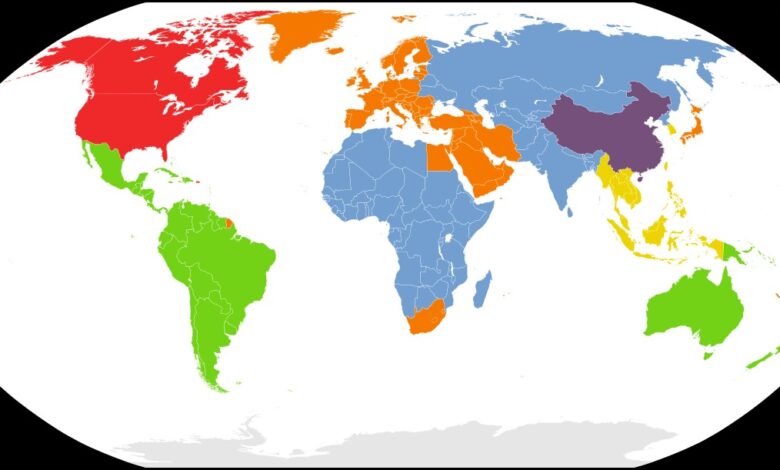
There are 8 total DVD region codes worldwide. Each code corresponds to a specific geographic area. Region 2 covers a large portion of the globe.
Region 2 includes Europe, Japan, South Africa, the Middle East (including Egypt), and Greenland. If your DVD is marked as Region 2, it will only work in players from these areas. Playing these discs outside Region 2 requires special methods or tools.
The region lock prevents standard players from reading discs from other regions. This can be frustrating for travelers and collectors. Many people buy DVDs abroad only to find they won’t play at home.
II. How to Rip a Region 2 DVD for Flexible Playback
Ripping Region 2 DVDs solves compatibility problems. Even within supported regions, some players may have issues. Creating digital copies gives you freedom to watch anywhere.
Leawo DVD Ripper is a powerful solution for converting Region 2 DVDs. The software transforms DVD content into common video formats. You can then play these files on any device without restrictions.
The ripper offers several key features. It maintains high-quality output during conversion. It supports many popular video formats like MP4, AVI, and MKV. You can also select specific audio tracks and subtitles.
A. Step-by-Step Ripping Guide
First, download and install the DVD ripper software on your computer. Insert your Region 2 DVD into your disc drive.
Launch the program and click the “Add Blu-ray/DVD” button. Select “Add from CD-ROM” and choose your DVD drive. The software will load your disc content automatically.
Next, choose your output format from the format menu. MP4 is recommended for the best compatibility. You can also adjust quality settings if needed.
Select audio tracks and subtitles from the available options. Click the profile icon to customize video and audio parameters. Set your output folder location.
Finally, click the “Convert” button at the bottom. The software will start ripping your DVD. Wait for the process to complete. Your converted video file will be ready for playback on any device.
III. Bonus: Use a Region-free DVD Player Software
Another solution is using region-free player software. Leawo Blu-ray Player removes region restrictions entirely.
This software plays DVDs from any region on your computer. You don’t need to convert or rip discs first. Simply insert the disc and start watching immediately.
The player supports various disc formats and video files. It delivers high-quality playback with clear audio. The interface is simple and easy to navigate.
This option works well if you frequently watch foreign DVDs. You keep your original discs and play them directly. No conversion time or storage space is needed.
IV. FAQ — Common Questions About Region 2 DVDs
Will Region 2 DVDs play in the U.S.?
No, Region 2 discs will not play in standard U.S. DVD players. The United States uses Region 1 coding. However, ripping the DVD to a video file removes this restriction. You can then watch the content on any device.
What is Region 2 on DVD?
Region 2 is a geographic code built into DVDs. It restricts playback to certain areas of the world. These areas include Europe, Japan, South Africa, Middle Eastern countries, and Greenland. The code prevents DVDs from working in players from other regions.
Can you convert a Region 2 DVD to Region 1?
You cannot change the physical disc’s region code directly. The coding is permanently embedded in the disc. However, ripping the DVD creates a region-free digital file. This file will play anywhere without regional limitations.